Category: AI & Technology

  • Get Better ChatGPT Answers: 5 Easy Changes

    Get Better ChatGPT Answers: 5 Easy Changes

    Have you asked ChatGPT a question and received an answer that was too long, too general, or simply not what you meant? You don’t need special computer language to explain what you want. This guide walks through five ways to make your requests clearer, with everyday examples you can copy and adapt. Start with one small task, then practice asking for an answer that fits your needs.

    1. Start with one clear task

    Before typing, ask yourself: “What do I want ChatGPT to help me finish?” Perhaps you need a birthday message, a packing list, or an explanation of an unfamiliar word. Name that task directly.

    Too general:

    “Help me with my garden.”

    More specific:

    “Create a checklist for tidying three patio flowerpots before I plant new flowers.”

    The second request tells ChatGPT what you want to accomplish. You can add details afterward, but a clear starting point gives the conversation direction.

    You don’t have to phrase every request as a question. “Write a checklist,” “Explain this term,” and “Help me draft a message” are useful ways to begin.

    Try it: Finish this sentence with a small task from your day: “Help me create…”

    2. Add details that matter

    ChatGPT doesn’t know your situation unless you explain it. A few useful details can help it give an answer that fits your day.

    Suppose you want ideas for spending an afternoon with your grandchildren. Their ages, your budget, and where you’ll be spending time all affect which suggestions would be useful.

    Too general:

    “Suggest activities for my grandchildren.”

    With helpful details:

    “Suggest five indoor activities for two grandchildren, ages 6 and 9, during a rainy afternoon. We have paper, crayons, and a deck of cards. Choose activities we can do together at the kitchen table without buying supplies.”

    You’ve given ChatGPT a clearer picture: who the activities are for, what’s available, and what limits to work within.

    Include details that change the answer. You can leave out names, addresses, and other private information.

    Try it: Take your request from tip #1 and add two useful details, such as how much time you have and what supplies you can use.

    3. Ask for a format and length you can use

    Sometimes an answer covers the right topic but is difficult to use. You might want a short checklist and receive several long paragraphs instead.

    Tell ChatGPT how you’d like the answer arranged. A numbered list works well for steps that must happen in order. Bullet points are useful for a shopping list. A short paragraph can work for a message you want to send.

    Without a format:

    “Help me prepare for a community potluck.”

    With a format and length:

    “Make a checklist for attending a community potluck where I’m bringing a cold pasta salad. Divide it into ‘The night before’ and ‘Before leaving.’ Keep it to eight short bullet points total.”

    You’ve described both the task and the shape of the answer. Read the result and adjust anything that doesn’t fit your plans.

    If an answer is still too long, you can ask: “Shorten this to the five most useful points.”

    Try it: Add one instruction to your own request: “Use a numbered checklist,” “Keep it under 100 words,” or “Give me three options.”

    4. Explain who the answer is for

    An explanation for someone learning a subject should sound different from one written for an expert. Tell ChatGPT what you already understand and where you need help.

    Without guidance:

    “Explain cloud storage.”

    With guidance:

    “Explain cloud storage to someone who knows how to save a file on a laptop but has never used online storage. Use everyday language and one simple comparison. Explain any technical terms you need to use.”

    This gives ChatGPT a starting point without making assumptions about what you know.

    For writing tasks, you can also describe the tone—the feeling you want the words to convey. You might ask for a message that sounds warm, professional, cheerful, or direct.

    For example: “Draft a friendly message declining a dinner invitation. Thank the host, keep it brief, and don’t invent a reason I can’t attend.”

    Read the draft before using it. Change any wording that doesn’t sound like you, and check that it says only what you mean.

    Try it: Add “Explain this for a complete beginner” to a question, or “Make it warm and conversational” to a writing request.

    5. Ask for one useful change

    Your first request doesn’t have to cover everything. Read the answer, decide what would make it more useful, and ask for that change in the same conversation.

    Suppose you asked for indoor activities for your grandchildren, but several suggestions require more preparation than you want.

    A useful follow-up:

    “Keep the card-game idea. Replace the other activities with ones that take less than five minutes to set up.”

    This tells ChatGPT what worked and what needs changing. You don’t have to repeat the entire original request.

    Other follow-ups you can try include:

    “Explain the second step more simply.”

    “Give me an example using supplies I already have.”

    “That sounds too formal. Rewrite it like a friendly text message.”

    If ChatGPT misunderstood your situation, correct it directly: “I meant activities for two children, not a whole classroom.”

    A clearer answer can still contain mistakes. Check important facts with a reliable source, and review any instructions before following them.

    Try it: Read an answer you’ve received and ask for one specific improvement. Keep refining until it fits your task.

    Put the five tips together

    Use this simple pattern when you’re unsure where to begin:

    “Help me [describe one task]. Here are the details: [include what matters]. Present the answer as [choose a format and length]. Use [describe the language or tone].”

    Replace the words in square brackets with your own information, then remove the brackets. Leave out any part you don’t need.

    Here’s a complete example:

    “Help me write an invitation to a neighborhood book swap. It’s on Saturday from 2 to 4 p.m., and each person can bring up to three books. Write a friendly text message under 75 words. Leave a placeholder for the location.”

    After reading the answer, you might follow up with:

    “Make it more casual, and mention that people are welcome even if they don’t bring a book.”

    Before sending the invitation, fill in the location and check every detail. ChatGPT provides a draft; you decide what to use.

    Choose one task to try today

    You don’t need to memorize a special formula. Start with one clear task, add useful details, and ask for an answer you can comfortably use. Then request one change if needed.

    Open chatgpt.com and try a small task from your day. Leave out passwords, account numbers, and private information about yourself or others.

    Want more examples to practice with? Get the free large-print ChatGPT guide for adults 50+. Enter your email on the signup page and confirm your subscription using the email you receive. We’ll then email you the guide.


  • 5 Useful Things to Try With ChatGPT Today

    5 Useful Things to Try With ChatGPT Today

    You’ve opened ChatGPT. The message box is waiting. Now what do you type?

    Start with something you already need to do: write a thank-you note, organize a busy afternoon, or make sense of an unfamiliar term. You don’t need technical vocabulary. A plain-English request is enough to begin.

    Here are five practical ideas, each with a request you can copy and a follow-up that helps you improve the answer.

    Before you begin

    Open chatgpt.com in your internet browser. When you have a chat open, type or paste a request into the message box and send it.

    A prompt is simply the request you give ChatGPT. In the examples below, replace anything in [square brackets] with your own details, then remove the brackets. For example, replace [a neighbor] with my neighbor Susan. Use made-up names if you prefer.

    Start with everyday information. Leave out passwords, account numbers, and other private details.

    1. Write a thoughtful note when the words won’t come

    Perhaps someone brought you dinner or helped with a repair. You know what you want to say, but getting started takes longer than expected.

    Try this prompt:

    Help me write a short thank-you note to [a neighbor] for [watering my plants while I was away]. Make it warm and natural, about four sentences. Don’t add details I haven’t given you.

    Then try this follow-up:

    Make it less formal and use simpler words.

    Read the draft aloud. Change anything you wouldn’t normally say. The finished note should sound like you, and you can add a personal detail before sending it yourself.

    2. Turn a cluttered task list into a manageable afternoon

    A list can feel overwhelming when every task seems equally urgent. Ask for a small, realistic plan using the time you actually have.

    Try this prompt:

    I have 90 minutes this afternoon. I need to fold laundry, tidy the kitchen, and sort one small stack of papers. Make a simple plan with a short break. Leave some extra time so I don’t feel rushed.

    Then try this follow-up:

    I only have 30 minutes now. Help me choose what to do first and what to leave for another day.

    Treat the answer as a draft schedule. Adjust the time estimates to match your pace. A useful plan should make the afternoon easier, not give you more to worry about.

    3. Understand a technology term without the jargon

    Words such as “browser,” “download,” and “Wi-Fi” are often used without explanation. You can ask for one clear explanation at a time.

    Try this prompt:

    Explain the difference between an internet browser and a search engine. Assume I’m a complete beginner. Use a familiar everyday comparison and keep the answer under 150 words.

    Then try this follow-up:

    Give me one example of each and explain how I would use them together.

    If you need help with a specific screen, describe your device and what you see. Before sharing a screenshot, check it for private information. Don’t follow instructions to erase files or change important settings unless you understand the result.

    4. Make a packing checklist you can check off

    It’s easier to notice what’s missing when your packing list is organized.

    Try this prompt:

    Make a packing checklist for a three-night visit to family. I’m traveling by car, staying in their home, and expect cool weather. Group the list into clothing, toiletries, travel essentials, and optional items. Keep it practical.

    Then try this follow-up:

    Shorten this to the essentials and add a small “before leaving home” checklist.

    Review the list for your personal needs. Check the actual weather forecast before packing; the example only tells ChatGPT to assume cool weather.

    5. Turn a family memory into a story

    You don’t need a polished first draft to start recording a memory. A few notes can be enough.

    Try this prompt:

    Help me turn these notes into a short family story: [describe a favorite childhood holiday or family tradition]. Keep my voice and use only the facts I provide. Ask me three questions about missing details before writing the story.

    Then try this follow-up:

    Make the story sound more conversational. Don’t invent dialogue, dates, or events.

    Read it carefully before sharing it. You are the source for the memory, so correct anything that doesn’t match what happened. Leave out sensitive details about other people.

    What if the first answer isn’t useful?

    You can continue in the same conversation. Try one of these requests:

    • Make this shorter.
    • Explain that word.
    • Give me only the first two steps.
    • Ask me a question before suggesting an answer.

    Clear instructions and relevant details help guide the response. You don’t have to get the wording perfect on your first attempt.

    ChatGPT can make mistakes, including confident-sounding ones. Check important facts with a reliable source, and review any draft before using it.

    Choose one thing to try today

    Pick the example that would help you most right now. Send the prompt, read the answer, and ask for one change. That small practice session is a useful first step.

    Want more useful answers? Read our guide: How to Ask ChatGPT Better Questions: 5 Simple Tips for Adults 50+

    Want more examples to keep beside you while you practice? Get the free large-print ChatGPT guide for adults 50+. Enter your email on that page and confirm your subscription using the email you receive. We’ll then email you the guide.

  • Your First ChatGPT Conversation: Start Here

    Your First ChatGPT Conversation: Start Here

    ChatGPT can seem confusing if you have never used artificial intelligence before, but getting started is easier than it looks. This beginner-friendly guide will walk you through the basics step by step so you can start using ChatGPT with confidence.

    What Is ChatGPT?

    ChatGPT is an artificial intelligence tool that can understand questions and instructions written in everyday language. You can use it to ask questions, explain difficult topics, brainstorm ideas, write or improve text, organize information, and help with many everyday tasks.

    How to Open ChatGPT

    1. Open an internet browser such as Chrome, Edge, Safari, or Firefox.
    2. Click the address bar at the top and type chatgpt.com, then press Enter.
    3. When ChatGPT opens, sign in if you already have an account or create a free account if you want your conversations saved. In supported regions, ChatGPT can also be tried without creating an account.
    4. Find the message box and type a question or instruction. This is called a prompt.
    5. Press Enter or the Send button. ChatGPT will respond, and you can continue the conversation by asking follow-up questions.

    Beginner Tip: Type chatgpt.com directly into the browser address bar so you know you are opening the official ChatGPT website.

    How to Start Your First Conversation

    Once ChatGPT is open, you do not need to know any special commands. Simply type what you want help with in plain, everyday language. The clearer you are about what you need, the easier it is for ChatGPT to give you a useful answer.

    For example, instead of typing only “dinner,” try giving ChatGPT more useful details:

    “Give me three simple dinner ideas for two people that take less than 30 minutes to make.”

    What Can You Ask ChatGPT?

    You can ask ChatGPT for help with many everyday tasks. You do not need to use special wording. Start by explaining what you want as clearly as you can.

    • Explain something you do not understand.
    • Help write or improve an email.
    • Brainstorm ideas for meals, gifts, trips, or projects.
    • Create a simple checklist or plan.
    • Summarize information.
    • Help organize your thoughts.
    • Suggest questions to ask when researching something.
    • Teach you how to do something step by step.

    How to Get Better Answers from ChatGPT

    You do not need to learn complicated commands to use ChatGPT well. A good prompt simply gives ChatGPT enough information to understand what you need. If the first answer is not quite right, you can continue the conversation and ask it to change, explain, shorten, simplify, or improve the answer.

    1. Say what you want. Start with the task or question you need help with.
    2. Give useful details. Include things such as your goal, budget, time available, experience level, or other important limits.
    3. Say how you want the answer. You can ask for simple instructions, a checklist, examples, a table, or a step-by-step explanation.
    4. Keep the conversation going. If something is confusing, ask ChatGPT to explain it differently or give you another example.

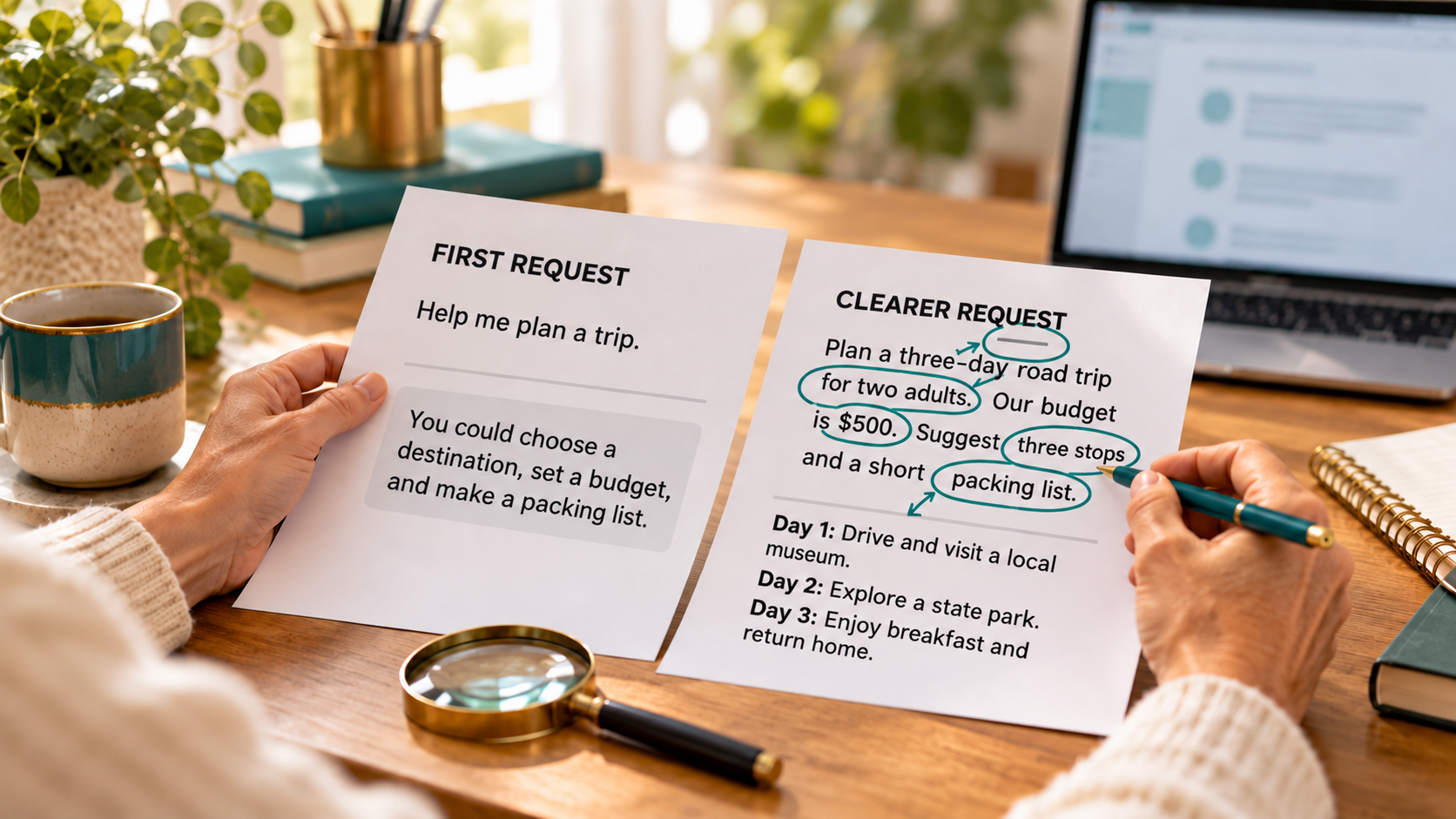
    For example, compare these two prompts:

    “Help me plan a vacation.”

    “Help me plan a three-day vacation for two adults with a $1,000 budget. We will be driving, prefer outdoor activities, and need simple hotel suggestions.”

    The second prompt gives ChatGPT more information to work with, so the answer can be much more useful and specific.

    A Few Things Every Beginner Should Know

    ChatGPT can be extremely helpful, but it is still an AI tool. Knowing a few simple things from the beginning will help you use it more safely and get better results.

    ChatGPT Can Make Mistakes

    ChatGPT can sometimes give an answer that sounds confident but is incomplete or incorrect. For important decisions involving money, health, legal matters, dates, or other facts that really matter, double-check the information before acting on it.

    Use Current Information When You Need It

    Some questions depend on information that changes over time, such as prices, news, business hours, travel information, or new technology. ChatGPT can search the web when current information is needed and may provide citations to the sources it used. Open those sources and make sure they actually support the answer, especially when accuracy matters.

    Be Careful With Private Information

    Avoid entering passwords, Social Security numbers, banking information, or other highly sensitive information into a chat. If you use a personal ChatGPT account, you can also go to Settings → Data Controls and turn off “Improve the model for everyone” if you do not want new conversations used to help improve OpenAI’s models.

    You Can Always Ask a Follow-Up Question

    You do not have to accept the first answer exactly as it is. Ask ChatGPT to explain something more simply, give another example, shorten the answer, create a checklist, or try a different approach. ChatGPT remembers the context of the conversation while you continue chatting.

    Try These Simple First Prompts

    If you are not sure what to type, start with one of these simple examples. You can copy a prompt, change the details, and make it fit what you need.

    1. “Explain [topic] to me like I am a complete beginner.”
    2. “Help me write a friendly email about [situation]. Keep it short and clear.”
    3. “Give me five inexpensive dinner ideas using ingredients I probably already have at home.”
    4. “Create a simple checklist to help me organize [room, project, trip, or task].”
    5. “Teach me how to do [task] step by step. Assume I have never done it before.”
    6. “Help me compare these two choices: [choice one] and [choice two]. Explain the advantages and disadvantages of each.”
    7. “Give me five ways I could save money on [expense]. Start with the easiest ideas.”
    8. “Help me plan my day. I need to accomplish [tasks] and I have [amount of time] available.”
    9. “Rewrite this so it sounds clearer and more professional: [paste your text].”
    10. “Ask me questions one at a time so you can better understand what I need help with regarding [topic].”

    These are only starting points. You can change the words, add details, or ask ChatGPT to improve the answer until it becomes useful for your situation.

    The first prompt does not have to be perfect. A conversation with AI is usually a process of asking, reviewing, and refining. Start with what you know, look at the response, then add details or ask follow-up questions until the answer becomes more useful.

    Where to Go From Here

    The easiest way to learn ChatGPT is to start using it. Pick one simple task from your everyday life and try asking ChatGPT for help. Do not worry about using perfect wording. Explain what you need, add useful details, and ask follow-up questions when something is unclear.

    As you become more comfortable, you can use ChatGPT for larger projects, research, planning, writing, learning, organizing information, and many other tasks. Start simple, experiment, and build your skills a little at a time.

    Quick Recap

    • ChatGPT lets you ask questions and give instructions in everyday language.
    • You can start with a simple request and add more detail when needed.
    • Better prompts usually include your goal, useful details, and the kind of answer you want.
    • You can ask follow-up questions instead of starting over.
    • Important information should be checked before you rely on it.
    • The best way to learn ChatGPT is to practice with real tasks from your own life.

    Ready to Practice?

    Choose one small task you need help with today and try it in ChatGPT. Start with a simple prompt, see what you get, and then ask a follow-up question to improve the answer. You will learn much faster by using ChatGPT than by trying to memorize a long list of rules.

    Need an idea to try? Read our guide: 5 Everyday Uses for ChatGPT for Adults 50+.